
Best Inexpensive Printer for Home Use That Saves You Cash!
As an Amazon Associate, I earn from qualifying purchases. This post contains affiliate links. Which means I may earn a small commission when make a purchase through my links, at no additional cost to you.
When evaluating print resolution, ink efficiency, and connectivity options, selecting the best inexpensive printer for home use involves a careful balance of performance and cost-effectiveness. Factors such as DPI (dots per inch), page yield, and compatibility with wireless networks and mobile devices play crucial roles in meeting everyday printing demands without compromising quality.
Understanding print speed variations between inkjet and laser technologies also contributes to making an informed choice tailored to home environments, where both document clarity and budget constraints matter. As home offices and remote learning continue to drive printing needs, identifying a device that optimizes these technical features while remaining affordable becomes increasingly important. Dive deeper into the key specifications and hidden benefits that can help you pinpoint the best inexpensive printer for home use.
Top Affordable Printing Solutions That Deliver Quality Without Breaking the Bank
| Image | Product | Price |
|---|---|---|
Pick 1  | HP DeskJet 2955 Wireless All-in-One Printer | Check Price On Amazon |
Pick 2 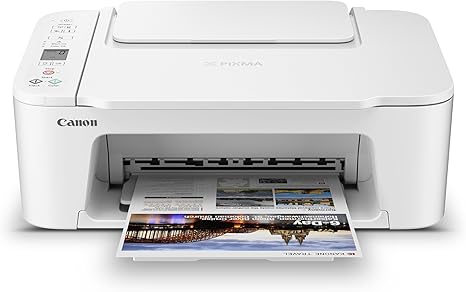 | Canon PIXMA TS3720 Wireless All-in-One Printer | Check Price On Amazon |
Pick 3  | Canon PIXMA TS4320 Wireless Inkjet Printer | Check Price On Amazon |
1. HP DeskJet 2955 Wireless All-in-One Printer
Discover the HP DeskJet 2955 Wireless All-in-One Printer, an ideal blend of affordability and convenience tailored for home use. This compact device offers seamless wireless printing, scanning, and copying, making everyday tasks efficient without compromising on quality or budget.
Equipped with HP Thermal Inkjet technology, this printer supports color printing and is compatible with envelopes and various media types. Its wireless capability enables direct printing from smartphones, tablets, and laptops, while HP Instant Ink eligibility ensures cost-efficiency. The flatbed scanner and one-year limited warranty add reliability to its versatile functionality.
The flatbed scanner and one-year limited warranty add reliability to its versatile functionality.
Pros
- Wireless connectivity allows printing from multiple devices including smartphones and tablets
- Compact size (11.97″D x 16.73″W x 6.06″H) fits comfortably in home environments
- Affordable price point with compatibility for HP Instant Ink subscription to reduce running costs
- All-in-one functionality: print, scan, and copy in one device
- Supports color printing with individual ink cartridges for optimal color management
Cons
- Print speed is modest at up to 6 pages per minute for black and white documents, which may be slower compared to some higher-end models
The HP DeskJet 2955 Wireless All-in-One Printer stands out as the best inexpensive printer for home use by balancing ease of operation, wireless convenience, and budget-friendly pricing. It’s an excellent choice for users seeking dependable performance without unnecessary complexity.
2. Canon PIXMA TS3720 Wireless All-in-One Printer
Discover the Canon PIXMA TS3720 Wireless All-in-One Printer, an ideal solution for home users seeking a compact, affordable, and versatile device. Combining print, copy, and scan functions with easy wireless connectivity, it offers reliable performance without breaking the bank—making it one of the best inexpensive printers for home use.
Equipped with fast print speeds of up to 7 black-and-white and 4 color images per minute, this inkjet printer delivers crisp, borderless photos up to 5” x 7”. Its intuitive 5” LCD screen and simple two-cartridge system ensure effortless operation while Dual Band Wi-Fi provides stable, hassle-free connections to a variety of devices including smartphones, Chromebooks, and PCs.
Pros
- All-in-one functionality: print, copy, and scan in one compact unit
- Easy wireless setup and compatibility with mobile printing apps like Canon PRINT, Apple AirPrint, and Mopria
- Supports versatile media types including envelopes, high-resolution paper, labels, and borderless photos
Cons
- Only supports single-sided printing, which may limit duplex printing needs
The Canon PIXMA TS3720 impresses as a budget-friendly inkjet printer tailored for everyday home use, combining ease of setup, reliable connectivity, and versatile media handling. Compared to other models in its price range, it offers superior mobile device printing and quick installation, making it an excellent choice for personal and small office environments.
3. Canon PIXMA TS4320 Wireless Inkjet Printer
Discover the perfect balance of affordability and functionality with the Canon PIXMA TS4320 Wireless Inkjet Printer, an ideal choice for home users and hybrid workers seeking reliable performance without breaking the bank. Its sleek design and versatile features make it a standout option for everyday printing needs.
Equipped with a 2-cartridge hybrid ink system, this compact printer delivers sharp text and vivid photo prints. Effortless setup and dual-band Wi-Fi support ensure seamless wireless connectivity.
Pros
- Affordable all-in-one solution combining printing, scanning, and copying
- High-quality color and document prints with hybrid ink technology
- Stable wireless connection via dual-band Wi-Fi for versatile mobile printing
Cons
- Print speed (11 ppm black & white) may be slower compared to some laser models
For users seeking the best inexpensive printer for home use, the Canon PIXMA TS4320 offers a compelling blend of print quality, wireless convenience, and eco-friendly features, making it a smart investment that stands out against similarly priced competitors.
4. Canon PIXMA TS6520 Wireless Inkjet Printer

The Canon PIXMA TS6520 Wireless Inkjet Printer stands out as a top choice for those seeking the best inexpensive printer for home use. It blends affordability with high-quality printing performance, ideal for handling both everyday documents and vibrant photos effortlessly.
Combining a compact design with versatile features such as automatic duplex printing, reliable dual-band Wi-Fi connectivity, and an intuitive OLED display, this all-in-one device simplifies printing, scanning, and copying tasks. Its hybrid ink system ensures sharp text and brilliant color accuracy, making it perfect for both casual and professional needs.
Pros
- Affordable versatility suitable for home and hybrid work environments
- High-quality output via a 2-cartridge hybrid ink system delivering crisp, vibrant prints
- Seamless wireless printing with dual-band Wi-Fi and mobile device compatibility
Cons
- Maximum black and white copy speed of 11 ppm may be slower compared to some competitors
Offering an impressive balance of cost-efficiency, quality, and ease of use, the Canon PIXMA TS6520 is an excellent investment for anyone looking to enhance their home printing experience without breaking the bank. Compared to similar models in its price range, it stands out with superior connectivity and print fidelity.
5. HP Envy 6155 Wireless All-in-One Inkjet Printer

Discover the perfect balance of affordability and functionality with the HP Envy 6155 Wireless All-in-One Inkjet Printer, ideal for home use. Designed by America’s most trusted printer brand, it delivers vibrant, high-quality color prints and versatile scanning and copying capabilities—all within an easy-to-use framework.
Equipped with a 4 intuitive color touchscreen, dual-band Wi-Fi, and auto 2-sided printing, this printer supports seamless wireless connectivity and efficient paper handling. It also features HP’s True-to-Screen technology for stunning photo printing and AI-driven print optimization, ensuring every page looks exactly as intended with minimal waste.
Pros
- High-quality color prints at up to 10 ppm for black and 7 ppm for color documents
- Convenient 3-month trial of HP Instant Ink for automatic ink delivery and up to 50% ink savings
- Compact design made with 60% recycled plastic, enhancing sustainability without compromising performance
Cons
- Requires use of original HP cartridges due to chip compatibility restrictions
Offering excellent value and comprehensive features, the HP Envy 6155 stands out as one of the best inexpensive printers for home use, especially when compared to similarly priced models that lack integrated AI print formatting or sustainable materials. Its user-friendly experience and reliable wireless performance make it a smart choice for everyday printing needs.
6. Brother Work Smart 1360 Wireless Color Inkjet All-in-One
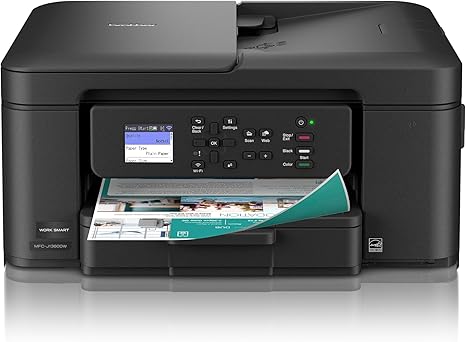
Discover the Brother Work Smart 1360 Wireless Color Inkjet All-in-One printer, perfect for home and small office environments. Combining affordability with versatile functionality, this compact device streamlines printing, copying, and scanning, delivering sharp, vibrant prints with seamless wireless convenience.
Equipped with automatic duplex printing, a 20-sheet ADF, and a generous 150-sheet paper capacity, it handles busy tasks effortlessly. Print directly from cloud services via a user-friendly 8” color display, and enjoy fast output speeds of up to 16 ppm in black and 9 ppm in color.
Pros
- Cost-effective all-in-one solution designed for home use with print, copy, and scan functions
- Supports cloud app printing and scanning for greater convenience and flexibility
- Fast print speeds and automatic duplexing improve productivity and reduce paper waste
Cons
- Limited to basic home office volumes; may not suit high-demand professional use
Offering excellent features at a budget-friendly price point, the Brother Work Smart 1360 stands out among inexpensive home printers. Its blend of speed, functionality, and cloud integration makes it an exceptional choice for everyday tasks without compromising quality or convenience.
7. Canon PIXMA TR7120 Wireless Inkjet Printer

Discover the ideal balance of affordability and performance with the Canon PIXMA TR7120 Wireless Inkjet Printer, designed to meet the versatile demands of home users and hybrid workers. Its compact design coupled with high-quality output makes it a standout choice among the best inexpensive printers for home use.
Equipped with a 2-cartridge hybrid ink system, this all-in-one printer delivers crisp text and vibrant photos effortlessly. Features like dual-band Wi-Fi, an intuitive OLED display, and automatic duplex printing enhance convenience, while support for multiple media types and an Auto Document Feeder streamline your everyday tasks.
Pros
- High-quality prints with sharp text and vivid colors thanks to the hybrid ink system
- Reliable wireless connectivity over both 2.4GHz and 5GHz Wi-Fi bands for seamless mobile printing
- Time-saving features including Auto Document Feeder and automatic two-sided printing
Cons
- Relatively heavier at 18 pounds compared to some compact home printers
For those seeking an affordable, versatile, and user-friendly printer, the Canon PIXMA TR7120 offers excellent value without compromising quality. Compared to similar models in this price range, it stands out with its dual-band wireless support and efficient multi-page handling capabilities.
8. HP DeskJet 4355 Wireless All-in-One Inkjet Printer

Discover the HP DeskJet 4355 Wireless All-in-One Inkjet Printer, a cost-effective solution for vibrant color printing at home. Combining versatility and ease of use, it suits everyday tasks such as printing bills, recipes, and letters—all while offering wireless convenience for seamless mobile printing.
Equipped with color printing, scanning, and copying capabilities, this compact printer features a 35-sheet auto document feeder and a 60-sheet input tray. HP’s AI technology enhances print formatting by removing unwanted content from web pages and emails, ensuring professional results with less wasted paper.
Pros
- Affordable color printing ideal for everyday home use
- Auto document feeder and decent input capacity streamline multitasking
- HP AI optimizes print layouts to save paper and enhance output
Cons
- Print speeds are moderate with up to 8.5 ppm for black text
The HP DeskJet 4355 offers a compelling mix of features, affordability, and smart printing technology, making it one of the best inexpensive printers for home use. Compared to other entry-level inkjets, it stands out with AI-assisted formatting and wireless ease, adding noteworthy value for budget-conscious users.
9. Epson Expression Home XP-4200 Inkjet Printer

Discover the Epson Expression Home XP-4200 Inkjet Printer, a standout choice for users seeking reliable, high-quality printing without breaking the bank. Perfectly suited for home use, this compact and efficient printer delivers crisp documents and vibrant photos with ease, making everyday printing tasks enjoyable and hassle-free.
Equipped with a sharp 4 color display and wireless connectivity, the XP-4200 allows seamless printing and scanning from smartphones or tablets via the Epson Smart Panel app. Its Micro Piezo Heat Free technology ensures consistent print quality, while individual ink cartridges and automatic two-sided printing help keep operational costs low and eco-friendly.
Pros
- Exceptional print quality with vibrant, borderless photos and sharp text documents.
- Wireless printing from Android and iOS devices plus voice-activated printing with Alexa support.
- Cost-effective operation through individual ink cartridges and automatic duplex printing.
Cons
- Print speed of 10 pages per minute may be slower compared to some laser printers.
The Epson Expression Home XP-4200 combines affordability, convenience, and dependable performance, making it an excellent option for home users who want quality printing without complexity. Compared to similar models, it offers better wireless integration and app control, ensuring a smooth user experience at a budget-friendly price.
10. HP DeskJet 4327 Wireless All-in-One Printer

The HP DeskJet 4327 Wireless All-in-One Printer offers a seamless blend of affordability and functionality, perfect for everyday home printing needs. Its user-friendly design and smart features make handling documents, photos, and more both simple and efficient.
Equipped with color printing, copying, scanning, and a 35-sheet auto document feeder, this compact printer supports wireless and mobile printing. HP AI technology optimizes print formats, while the intuitive LCD panel and reliable dual-band Wi-Fi enhance ease of use and connectivity.
Pros
- Versatile all-in-one functionality including print, scan, and copy with an auto document feeder
- HP AI feature ensures precise formatting and eliminates unnecessary content from prints
- Wireless dual-band Wi-Fi and mobile app support enable effortless remote printing
Cons
- Print speeds are moderate, with up to 8.5 ppm in black and 5.5 ppm in color
Offering eco-friendly construction with recycled materials and energy certifications, the HP DeskJet 4327 stands out as the best inexpensive printer for home use, delivering convenience and quality without stretching your budget.
Top Picks for the Best Inexpensive Printer for Home Use: Quality on a Budget
Print quality and resolution
Print clarity largely depends on the printer’s DPI (dots per inch), which determines how sharp and detailed your documents or photos will appear. Higher DPI values result in crisper images and finer text, making it especially important for projects that involve detailed graphics or photographs.
Additionally, the type of ink or toner used influences both the quality and cost-effectiveness of printing. Inkjet printers generally provide vibrant color reproduction ideal for photos, while laser printers using toner offer faster printing speeds and stronger text output for everyday document needs. Considering whether most prints will be in color or black-and-white also matters, as color accuracy is crucial for images and presentations, whereas black-and-white printing tends to be more economical and sufficient for routine text documents.
Printing speed and volume
Having multiple ways to connect a printer to your devices enhances both convenience and flexibility, especially in a home environment where various gadgets like laptops, smartphones, and tablets are commonly used. Wireless options such as Wi-Fi or Bluetooth allow for seamless printing without the hassle of cables, making it easier to print from anywhere within range. Additionally, the availability of multiple ports, including USB and Ethernet, ensures compatibility with different setups and provides room for future upgrades or additional accessories like external memory cards or scanners.
Additionally, the availability of multiple ports, including USB and Ethernet, ensures compatibility with different setups and provides room for future upgrades or additional accessories like external memory cards or scanners.
Options for expanding the printer’s capabilities can greatly improve its functionality over time. Features like additional paper trays or memory slots not only increase the printer’s capacity but also help manage larger workloads without frequent interruptions.
Assessing these elements beforehand helps in choosing a device that remains useful and efficient, avoiding the need for early replacements or costly add-ons.
Connectivity options
Printers equipped with multiple ways to connect ensure smoother integration with various devices around the home. Models offering USB ports provide a reliable, straightforward link to desktop computers, while wireless options such as WiFi and Bluetooth enable flexible placement and hassle-free printing from laptops, tablets, or smartphones. Built-in support for mobile printing standards like AirPrint and Google Cloud Print allows users to effortlessly send documents directly from their mobile devices without needing additional apps or software.
Ease of setup is another key factor. Devices that support automatic network detection and simple installation processes reduce frustration and downtime, especially for users who are not tech-savvy.
| Connection Type | Advantages | Ideal Usage |
|---|---|---|
| USB | Stable performance, plug-and-play | Single-user desktops |
| WiFi | Wireless convenience, supports multiple devices | Shared household use, mobile devices |
| Bluetooth | Quick pairing, short-range wireless printing | On-the-go printing, smartphones |
Cost of consumables
Having multiple ways to connect a printer to your devices can significantly enhance convenience and workflow efficiency. Wireless options such as Wi-Fi and Bluetooth allow for easy printing from smartphones, tablets, and laptops without tangled cables, while USB and Ethernet ports provide stable and fast connections for desktops.
Additionally, the availability of extra ports or memory card slots can enable expanded functionality, such as direct printing from external storage or the ability to add accessories like additional paper trays or scanners, making the printer adaptable to varying needs and future upgrades.
Printer features and functionality
Modern printers often combine multiple functions such as printing, scanning, copying, and faxing into a single device, which can greatly enhance convenience and save space in a home environment. Having these all-in-one capabilities ensures versatility without the need for separate machines, making it easier to handle various tasks with one compact unit.
Considering the physical size and design is equally important since home spaces can be limited. A printer with a slim, sleek profile fits well on desks or shelves without creating clutter, while models that are too bulky might overwhelm smaller areas or require dedicated furniture. Evaluating these features ensures that the printer integrates seamlessly into your living or workspace, balancing functionality with practical placement.
Brand reputation and support
Having multiple options to connect a printer to various devices can drastically improve convenience and flexibility. Wireless capabilities, such as Wi-Fi or Bluetooth, allow you to print directly from smartphones, tablets, and laptops without needing physical cables. USB ports and memory card slots also offer straightforward ways to expand the printer’s usefulness, enabling faster data transfers and support for different media types.
USB ports and memory card slots also offer straightforward ways to expand the printer’s usefulness, enabling faster data transfers and support for different media types. These features ensure the device can easily integrate with your existing setup and accommodate future technology, saving time and effort in daily printing tasks.
FAQ’s
What Features Should I Look For In An Inexpensive Printer For Home Use?Look for an inexpensive home printer with essential features like good print quality, wireless connectivity for easy printing from multiple devices, and low-cost ink or toner options. Additionally, consider models with compact design and basic scanning or copying functions to maximize value.
Which Inkjet Printers Are The Most Affordable And Reliable For Everyday Home Printing?Affordable and reliable inkjet printers for everyday home use typically include models like the Epson EcoTank series and Canon PIXMA series, known for low-cost ink refills and consistent print quality. These printers offer a good balance of efficiency and budget-friendly operation for regular printing needs.
Are Laser Printers A Better Cost-Effective Option Than Inkjet Printers For Home Use?Laser printers are generally more cost-effective for home use if you print frequently, as they have lower cost per page and longer-lasting toner cartridges. However, for occasional use and high-quality photo printing, inkjet printers may be more suitable despite higher ink costs.
How Do Printing Costs Compare Between Budget-Friendly Printers For Home Use?Printing costs for budget-friendly home printers are generally higher per page compared to more expensive models, mainly due to lower-cost ink cartridges that have smaller capacities. However, these printers are cost-effective upfront, making them suitable for light, occasional printing needs.
What Are The Best Compact And Budget Printers Suitable For Occasional Home Printing Tasks?The best compact and budget printers for occasional home printing tasks are models like the HP DeskJet 2755e and Canon PIXMA MG3620, which offer reliable basic printing, scanning, and copying features at an affordable price. These printers are easy to set up, space-saving, and ideal for low-volume printing needs.
Conclusion
When searching for the best inexpensive printer for home use, consider factors like print quality, speed, connectivity, and cartridge costs. Popular budget-friendly options often include compact inkjet and laser printers that balance affordability with performance. Choosing a reliable, cost-effective model ensures you can handle everyday printing tasks without breaking the bank, making it ideal for students and families alike.


