
Best Inexpensive Home Printer That Blows Minds Cheap!
As an Amazon Associate, I earn from qualifying purchases. This post contains affiliate links. Which means I may earn a small commission when make a purchase through my links, at no additional cost to you.
In the realm of digital imaging and print technology, factors such as DPI resolution, ink cartridge efficiency, and connectivity options significantly influence the overall performance of a home printer. Balancing high-quality output with cost-effectiveness often involves navigating a complex array of specifications, from print speed measured in pages per minute (PPM) to compatibility with wireless protocols like Wi-Fi and Bluetooth.
For those seeking reliable functionality without compromising budget constraints, identifying the best inexpensive home printer requires a discerning evaluation of these technical attributes alongside user experience. Understanding how these elements converge can reveal surprising insights into affordable devices that do not sacrifice quality or convenience. Dive deeper into this analysis to discover which models stand out in the competitive landscape of budget-friendly printers.
Affordable Printing Solutions That Deliver Quality Without Breaking the Bank
| Image | Product | Price |
|---|---|---|
Pick 1  | HP DeskJet 2955 Wireless All-in-One Inkjet Printer | Check Price On Amazon |
Pick 2  | HP Envy 6155 Wireless All-in-One Inkjet Printer | Check Price On Amazon |
Pick 3  | Canon PIXMA TR4720 Wireless All-in-One Printer | Check Price On Amazon |
1. HP DeskJet 2955 Wireless All-in-One Inkjet Printer
Discover the HP DeskJet 2955 Wireless All-in-One Inkjet Printer, an affordable solution designed to meet your everyday printing, scanning, and copying needs. Crafted to fit seamlessly into your home environment, it combines convenience with quality output without breaking the bank.
This compact all-in-one printer offers wireless connectivity for effortless printing directly from your phone, tablet, laptop, or PC. Equipped with HP Thermal Inkjet technology, it delivers vibrant color prints and sharp black-and-white copies at a maximum speed of 6 pages per minute, making it ideal for home and small office use.
Pros
- Wireless printing from mobile devices simplifies workflow and reduces clutter.
- Supports various print media, including envelopes, enhancing versatility.
- Eligible for HP Instant Ink subscription, offering cost-effective ink management.
Cons
- Slower print speed compared to some competing models, with a maximum of 6 pages per minute.
Balancing affordability, wireless functionality, and reliable print quality, the HP DeskJet 2955 stands out as one of the best inexpensive home printers. When compared to similar models, it offers a comprehensive all-in-one package ideal for casual users seeking simplicity and efficiency.
2. HP Envy 6155 Wireless All-in-One Inkjet Printer
Discover exceptional printing quality and convenience with the HP Envy 6155 Wireless All-in-One Inkjet Printer, designed to fulfill everyday home printing needs. Its compact design and user-friendly features make it an ideal choice for producing vibrant documents and borderless photos with ease.
This versatile printer offers color printing, copying, and scanning capabilities, paired with automatic two-sided printing and a 100-sheet input tray. Featuring a responsive 4 color touchscreen and robust dual-band Wi-Fi, it ensures seamless wireless connectivity. Additionally, HP’s AI print optimization and true-to-screen technology deliver precise, high-quality results every time.
Pros
- Efficient wireless printing with reliable dual-band Wi-Fi that automatically resolves connection issues.
- Comprehensive all-in-one functionality: print, copy, and scan with a compact flatbed scanner.
- Convenient HP Instant Ink subscription offers up to 50% savings on ink and hassle-free delivery.
Cons
- Compatible only with original HP cartridges equipped with proprietary chips, limiting third-party ink options.
Providing a perfect balance of affordability and advanced features, the HP Envy 6155 stands out as one of the best inexpensive home printers available, ideal for users seeking quality and ease of use without breaking the bank.
3. Canon PIXMA TR4720 Wireless All-in-One Printer
Discover the perfect blend of affordability and functionality with the Canon PIXMA TR4720 Wireless All-in-One Printer. Ideal for home use, it offers reliable printing, copying, scanning, and faxing capabilities in a compact, energy-efficient design, making it an excellent choice among the best inexpensive home printers.
Equipped with wireless connectivity and an automatic document feeder, this Canon printer streamlines your workflow with versatile features like auto two-sided printing and easy ink cartridge replacement. Produce crisp black text and vibrant color prints, including borderless photos up to 5 x 11, while benefiting from a quiet operation and ENERGY STAR certification.
Pros
- Wireless 4-in-1 functionality: print, copy, scan, and fax from multiple devices including smartphones
- Automatic two-sided printing and 100-sheet front paper tray for efficient handling of documents
- Smart Alexa integration allows for ink level monitoring and effortless reordering without subscriptions
Cons
- Print speeds are moderate, with up to 8.8 ipm for black documents, which may be slower than higher-end models
Compact and versatile, the Canon PIXMA TR4720 balances cost and performance superbly, especially for home environments where budget-conscious users seek dependable and wireless printing solutions. Compared to similar printers in its class, it stands out with smart voice assistant integration and efficient paper handling.
4. Canon PIXMA TS4320 Wireless Inkjet Printer

Discover exceptional printing quality combined with affordability in the Canon PIXMA TS4320 Wireless Inkjet Printer. Ideal for home use and hybrid work environments, this compact all-in-one device delivers vibrant prints and reliable wireless connectivity, making it a top choice for those seeking the best inexpensive home printer option.
Equipped with a 2-cartridge hybrid ink system, the PIXMA TS4320 produces sharp text and vivid color documents effortlessly. Its dual-band Wi-Fi support ensures stable wireless printing, while features like auto two-sided printing and integrated scanning enhance productivity. Compact design and mobile printing capabilities complete its versatile functionality.
Compact design and mobile printing capabilities complete its versatile functionality.
Pros
- High-quality print output with sharp text and vibrant colors from hybrid ink technology
- Stable wireless connection via dual-band Wi-Fi for flexible placement and ease of use
- Eco-friendly automatic duplex printing reduces paper usage and boosts efficiency
Cons
- Maximum copy speed of 11 pages per minute may be slower than some competitors
Offering a balanced mix of quality, convenience, and environmental consideration, the Canon PIXMA TS4320 stands out as a reliable and cost-effective printing solution. When compared to other budget inkjet models, it provides superior color accuracy and versatile media support, making it an excellent choice for everyday home and office tasks.
5. Canon PIXMA TS6520 Wireless Inkjet Printer

Discover the Canon PIXMA TS6520 Wireless Inkjet Printer, a reliable and budget-conscious solution tailored for home and hybrid work environments. Combining affordability with high-quality output, it delivers vibrant prints and versatile functionality without compromising on style or space.
Equipped with a 2-cartridge hybrid ink system, this all-in-one printer produces sharp text and vivid photos. Its dual-band Wi-Fi ensures stable wireless connections, while features like automatic duplex printing and an intuitive OLED display streamline your printing, scanning, and copying tasks effortlessly.
Pros
- High-quality prints with hybrid ink technology for crisp text and vibrant color
- Convenient wireless setup including dual-band Wi-Fi and mobile printing compatibility
- Space-saving design complemented by a clear, easy-to-read OLED display
Cons
- Copy speed of 11 pages per minute may be slower compared to some competitors
Offering excellent value for its price point, the Canon PIXMA TS6520 stands out as a top choice among best inexpensive home printers. Its balance of print quality, wireless convenience, and compact design makes it ideal for everyday tasks, outperforming many similarly priced models.
6. Canon PIXMA TS3720 Wireless All-in-One Printer
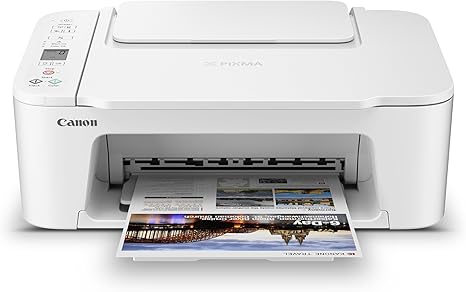
Discover the Canon PIXMA TS3720 Wireless All-in-One Printer, an affordable and reliable solution designed to meet your everyday printing, scanning, and copying needs. Combining compact design with wireless convenience, this printer offers impressive functionality without breaking the bank, making it ideal for home and small office use.
Equipped with fast print speeds—up to 7 black and 4 color pages per minute—the TS3720 supports versatile media types including envelopes, high-resolution paper, and borderless photos up to 5” x 7”. Dual Band Wi-Fi ensures a stable wireless connection, and the intuitive 5” LCD screen streamlines navigation.
Its simple ink replacement and mobile printing capability further enhance user experience.
Pros
- All-in-one functionality: print, copy, and scan capabilities in a compact unit
- Wireless connectivity with Dual Band Wi-Fi and easy mobile device printing through Canon PRINT app, Apple AirPrint, and Mopria
- Supports creative projects with versatile media and free POSTERARTIST Online software for banners and signage
Cons
- Single-sided printing only, which may impact efficiency for double-sided document needs
For those seeking the best inexpensive home printer with comprehensive features and reliable wireless connectivity, the Canon PIXMA TS3720 stands out as a practical choice. It balances performance, ease of use, and affordability, making it suitable for students, remote workers, and casual home users.
Compared to similar models, it delivers speedy printing and versatile media support at a competitive price point.
7. Brother Work Smart 1360 Wireless Color Inkjet All-in-One
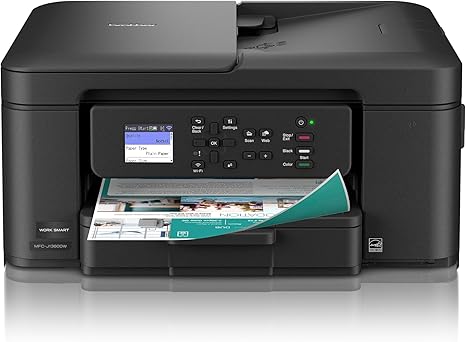
Discover the Brother Work Smart 1360 Wireless Color Inkjet All-in-One, an affordable and compact solution perfect for home and home office needs. Designed to deliver vibrant prints, efficient copying, and high-quality scanning, it provides reliable performance for documents, schoolwork, and reports without stretching your budget.
Equipped with automatic duplex printing, a 20-sheet Automatic Document Feeder, and a sizable 150-sheet paper tray, this printer offers full-size features in a space-saving design. Seamless wireless and USB connectivity, along with cloud app integration, provide versatile printing options through a user-friendly 8” color display.
Pros
- Automatic double-sided printing enhances productivity and saves paper.
- Wireless connectivity and mobile app support allow convenient printing from smartphones and tablets.
- Compact design with a generous paper capacity fits comfortably in any workspace.
Cons
- Color printing speed (9 ppm) is slower compared to some higher-end models.
Offering a blend of essential features, user-friendly operation, and wireless convenience at an accessible price, the Brother Work Smart 1360 stands out as one of the best inexpensive home printers. Its reliable performance makes it a strong contender for those seeking quality without compromise.
8. Canon PIXMA TR7120 Wireless Inkjet Printer

Discover the Canon PIXMA TR7120 Wireless Inkjet Printer, an affordable and versatile solution tailored for home users and hybrid workers alike. Delivering sharp text and vivid photo quality, it stands out as an excellent choice for those seeking reliable and vibrant printing without breaking the bank.
Equipped with a dual-cartridge hybrid ink system and dual-band Wi-Fi, this compact printer ensures effortless wireless connectivity and crisp output. Features like an auto document feeder, automatic duplex printing, and a user-friendly OLED display enhance productivity and ease of use, making multi-page tasks and mobile printing straightforward and efficient.
Pros
- Exceptional print quality with hybrid ink cartridges for sharp text and vibrant photos
- Seamless wireless connectivity through dual-band Wi-Fi for flexible printing locations
- Convenient features like auto duplex printing, auto document feeder, and a clear OLED display
Cons
- Print speed may be slower compared to some laser printers, with up to 11 ppm for black and white
Overall, the Canon PIXMA TR7120 strikes an excellent balance between affordability and functionality, making it one of the best inexpensive home printers available. Its compact design and advanced features cater efficiently to everyday printing, scanning, and copying needs, setting it apart from other budget inkjet options.
9. HP DeskJet 4355 Wireless All-in-One Inkjet Printer

Discover the HP DeskJet 4355 Wireless All-in-One Inkjet Printer, the perfect solution for affordable, versatile home printing. Designed to handle everyday color documents with ease, this compact device offers wireless convenience and reliable performance without breaking the bank.
Equipped with color print, copy, and scan capabilities, the HP DeskJet 4355 features a 35-sheet auto document feeder and a 60-sheet input tray for efficient task management. Its intuitive icon LCD, dual-band Wi-Fi, and HP AI technology ensure precise, waste-free printing directly from your smartphone or computer.
Pros
- Reliable wireless connectivity with automatic connection troubleshooting
- HP AI optimizes print formatting, reducing wasted pages and awkward layouts
- Compact design crafted from 70% recycled plastics, ENERGY STAR and EPEAT certified for sustainability
Cons
- Print speeds are moderate at 8.5 ppm black and 5.5 ppm color, which might feel slow for heavy users
Offering a balance of functionality, sustainability, and affordability, the HP DeskJet 4355 is an excellent choice among inexpensive home printers. Its user-friendly features and eco-conscious design make it a strong contender for anyone seeking reliable all-in-one performance without sacrificing quality.
10. HP DeskJet 4327 Wireless All-in-One Printer

Discover the HP DeskJet 4327 Wireless All-in-One Printer, a compact and eco-friendly solution tailored for everyday home printing needs. Combining essential functions with wireless convenience, it delivers clear color prints, copying, and scanning seamlessly, making it an excellent choice for budget-conscious users seeking reliable performance.
Equipped with a 35-sheet auto document feeder and a 60-sheet input tray, this printer handles multiple tasks efficiently. HP AI optimizes print formatting by removing unwanted content from web pages and emails, ensuring professional-quality output without wasting paper.
Its dual-band Wi-Fi connection and intuitive icon LCD enhance user interaction and reliability.
Pros
- Integrated AI technology for precise print formatting and minimal paper waste
- Wireless and mobile printing compatibility via HP App for convenience
- Sustainable design using at least 70% recycled plastics, ENERGY STAR and EPEAT certified
Cons
- Printing speed is moderate compared to higher-end models—up to 8.5 ppm black and 5.5 ppm color
At an affordable price point, the HP DeskJet 4327 offers a balanced mix of functionality, sustainability, and smart technology, making it a leading choice among inexpensive home printers. For users prioritizing wireless convenience and everyday document handling, it stands out as a dependable, cost-effective option.
Top Picks for the Best Inexpensive Home Printers That Deliver Big Value
Printing needs and usage
Printers that support multiple connection options such as Wi-Fi, USB, and mobile printing provide greater flexibility, allowing users to print from various devices without hassle. This versatility ensures smooth handling of different printing volumes, whether it’s occasional documents or frequent high-volume tasks. Additionally, having the ability to add compatible accessories or additional paper trays can accommodate diverse document types, including text-heavy reports, vibrant photos, and detailed graphics, without the need for constant manual adjustments.
Moreover, selecting a device that offers both color and monochrome printing options can significantly impact overall cost-efficiency and output quality, especially if the primary need involves black-and-white documents but occasional color prints are also required.
| Feature | Benefits | Considerations |
|---|---|---|
| Multiple connection methods | Easy printing from laptops, smartphones, and tablets | Check compatibility with frequently used devices |
| Expandable components | Handles larger paper sizes and volumes without interruption | Verify availability and cost of extra trays or memory |
| Color vs. Monochrome | Cost savings on black-and-white prints; flexibility for images and graphics | Assess typical document needs to avoid unnecessary expenses |
Printer types
Printers that offer multiple options for connecting to various devices and allow easy upgrades or additional features provide greater flexibility and convenience in everyday use. Wireless and USB capabilities enable seamless printing from smartphones, tablets, or laptops, while models supporting memory card slots or additional paper trays can adapt as your needs grow.
Understanding the differences between inkjet and laser printers is crucial since they affect both print quality and speed. Inkjet printers generally excel in producing vibrant color images and photos with fine detail, making them ideal for users who prioritize print quality for creative projects. However, they tend to be slower and require more frequent ink replacements.
Laser printers, on the other hand, are favored for their fast output and crisp black-and-white text, which suits heavy document printing needs. These devices often have a higher initial cost but lower operating expenses over time, making them cost-effective for those with large-volume printing requirements.
| Printer Type | Print Quality | Speed | Ideal User | Budget Range |
|---|---|---|---|---|
| Inkjet | Excellent for photos and color | Slower | Casual users, photo enthusiasts | Low to mid |
| Laser | Sharp text, less vibrant color | Fast | Office or heavy document users | Mid to high |
Cost considerations
Wireless options, USB ports, and compatibility with mobile devices all play a crucial role in ensuring a printer fits seamlessly into your home setup. Having multiple ways to connect allows for greater flexibility, whether you want to print directly from your smartphone, laptop, or even via cloud services. Additionally, the ability to add extra trays or upgrade components can extend the printer’s functionality over time, saving you from needing a complete replacement as your needs evolve.
Additionally, the ability to add extra trays or upgrade components can extend the printer’s functionality over time, saving you from needing a complete replacement as your needs evolve. This adaptability helps accommodate diverse printing tasks and varying volumes, making the device more versatile and future-proof.
Print quality and speed
Understanding how a printer connects to your devices and the ability to add future upgrades plays a crucial role in its overall convenience and lifespan. A device that offers multiple connection options, such as USB, Wi-Fi, or Ethernet, ensures seamless integration with computers, smartphones, and tablets, making printing effortless from any source. Additionally, having the option to attach extra modules or memory cards can enhance functionality and accommodate evolving needs, preventing the frustration of outdated limitations.
This adaptability not only simplifies everyday tasks but also maximizes value over time, especially for users who may want to expand their printing capabilities without investing in a new machine.
Connectivity and compatibility
Modern printers often come equipped with wireless and Bluetooth capabilities, allowing for effortless printing without the hassle of cords. This flexibility is essential for households where multiple devices, such as laptops, smartphones, and tablets, may need to send print jobs from different locations.
Mobile printing features and dedicated apps further streamline the process by enabling direct printing from phones or tablets, often with added control over print settings and document management. These functionalities not only save time but also enhance convenience, making it easier to produce documents, photos, or assignments quickly and efficiently.
| Feature | Benefits |
|---|---|
| Wireless & Bluetooth | Reduces clutter, supports multi-device access, allows placement flexibility |
| Device & OS Compatibility | Ensures smooth operation across various platforms, minimizes setup challenges |
| Mobile Printing & Apps | Enables on-the-go printing, easier document management, customizable settings |
Additional features
Many affordable home printers now come equipped with duplex printing, which allows for double-sided printing without manually flipping the pages. This feature not only saves paper but also enhances efficiency for everyday tasks.
Additionally, having integrated scanner and copier functions can transform a simple printer into a versatile all-in-one device, reducing the need for multiple gadgets on your desk.
Compact design and portability are equally important. Smaller footprint printers fit easily into tight spaces and can be moved around with ease, making them ideal for various home environments. Sleek and modern designs also blend seamlessly with home decor, ensuring that the printer doesn’t become an eyesore or take up unnecessary room.
Sleek and modern designs also blend seamlessly with home decor, ensuring that the printer doesn’t become an eyesore or take up unnecessary room.
| Feature | Benefit |
|---|---|
| Duplex Printing | Reduces paper use, speeds up printing jobs |
| Scanner & Copier | Multi-functionality, space-saving |
| Size & Portability | Fits small spaces, easy to relocate |
| Design | Aesthetic appeal, complements home setup |
FAQ’s
What Are The Top Features To Look For In An Inexpensive Home Printer?The top features to look for in an inexpensive home printer include reliable print quality, low cost per page, and wireless connectivity for easy printing from multiple devices. Additionally, consider a compact design and compatibility with various paper sizes to suit everyday printing needs.
Which Brands Offer The Most Reliable Budget-Friendly Printers For Home Use?Brands like HP, Canon, and Brother are known for offering reliable budget-friendly printers ideal for home use. These brands provide models that balance affordability with good print quality and low maintenance costs.
How Do Ink Costs Compare Among The Best Inexpensive Home Printers?Ink costs among the best inexpensive home printers can vary significantly, with some models offering more affordable refill options or high-yield cartridges that lower the cost per page. Generally, printers that use ink tank systems tend to have lower ongoing ink expenses compared to traditional cartridge-based models.
Are All-In-One Printers Worth The Investment For Home Use On A Budget?All-in-one printers can be worth the investment for home use on a budget if you need printing, scanning, and copying in one compact device, saving space and money. However, if your printing needs are minimal, a basic printer might be more cost-effective in the long run.
What Is The Average Lifespan Of The Best Inexpensive Home Printers?The average lifespan of the best inexpensive home printers is typically around 3 to 5 years with regular use. Proper maintenance and timely replacement of ink or toner can help extend their longevity.
Conclusion
When searching for the best inexpensive home printer, balance cost with features like print quality, speed, and connectivity. Affordable options now offer wireless capabilities, color printing, and reliable performance perfect for everyday tasks.


